
A Step-by-Step Guide
If you’ve ever wondered why your emails aren’t landing in inboxes, this might be the missing piece.
Email warm-up is one of the most important steps when you’re starting (or re-starting) to send emails, using a new domain, or moving to a new system like Oh My Hi.
This process might feel slow, but it’s one of the most important things you can do to make sure your emails actually get seen.
Let’s walk through it together in a simple, non-overwhelming way.
TL;DR (New Oh My Hi Plus users)
This warm-up process is only needed if you’re importing a list of over 500 contacts and haven’t been regularly sending emails from your domain email. If you’re unsure whether this applies to you, feel free to email us at [email protected]
What Is Email Warm-Up (In Plain English)
Email warm-up is the process of slowly introducing your email sending to inbox providers like Gmail, Outlook, and Yahoo.
Instead of sending to your whole list at once, you:
- Start small
- Send to your most engaged people first
- Gradually increase your volume
This builds trust and helps your emails land in the inbox, not spam.
Why This Matters
Your sending reputation matters more than most people realize.
Email sending providers like Oh My Hi typically require:
- Bounce rate: under 10%
- Spam complaints: under 0.1%
If those limits are exceeded, sending can be paused or disabled because inbox providers like Gmail, Outlook and Yahoo will start sending your emails to spam.
Warm-up helps you stay well below those limits.
Before You Start (Do Not Skip This Step)
Before sending a single email, you need to clean your list.
Only include people who:
- Opened or clicked in the last 30–60 days (if you are moving from another email provider)
- Gave you permission to email them, for example, opted in via a form
- Have not unsubscribed or marked your emails as spam before (it’s simple, do not import anyone who has unsubscribed or marked you as spam in another email platform)
Remove:
- Inactive subscribers (get rid of people who are not opening your emails, as this brings down your stats, a big list is not always a good list)
- Purchased lists (do not import any contacts into Oh My Hi unless you have explicit consent to email them, for example, they have purchased from you within the last 12 months or have opted into your email list)
- Role-based emails like info@, admin@, support@ (these are not true contacts and can give you false stats)
💡 Important:
The biggest mistake people make is including old or cold subscribers too soon. Remember, a big list is not always better.
Step 1: Your Sending Domain
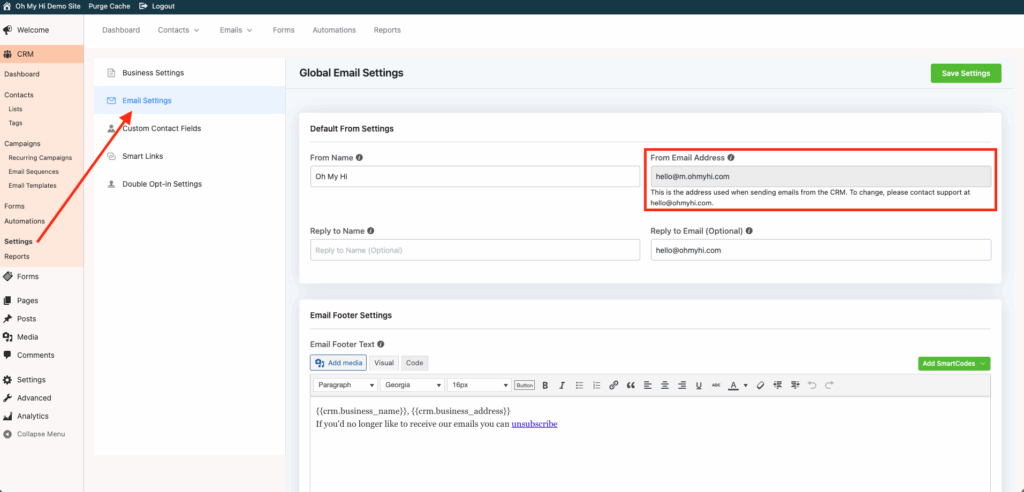
When you subscribe to Oh My Hi with either the Plus or Premium plan, we will help you set up your sending domain and email. Your email will be:
[email protected], unless you indicate otherwise (learn more about How Email Works on your Oh My Hi Website).
This allows your email sending to be properly linked to your domain.
Step 2: Start With a Simple Warm-Up Email
For your first emails, keep things very simple:
- No images
- No links
- Text only
Here’s a recommended template you can use:
Hi {{contact.first_name}},
I’m [insert name] with [insert company] — we’ve connected in the past, whether through a [insert how you met], or maybe a previous order.
I’m reaching out because I’m starting something new that I think you’ll enjoy.
In the coming weeks, I’ll be sending a few emails with [insert topic], [insert topic], and [insert topic] — all designed to make [insert goal] a little simpler (and more fun).
If that sounds good, there’s nothing you need to do, you’ll start receiving those emails soon.
But if you’d prefer not to, no worries. You can unsubscribe anytime using the link at the bottom of this email.
Looking forward to reconnecting and sharing more with you.
Warmly,
[Your Name]
Optional: Test Your Email Before Sending
Before sending to your list, you can test your email deliverability by following these steps:
- Load the email into the CRM
- Go to Mail-tester Newsletters spam test by mail-tester.com
- Copy the email address it gives you
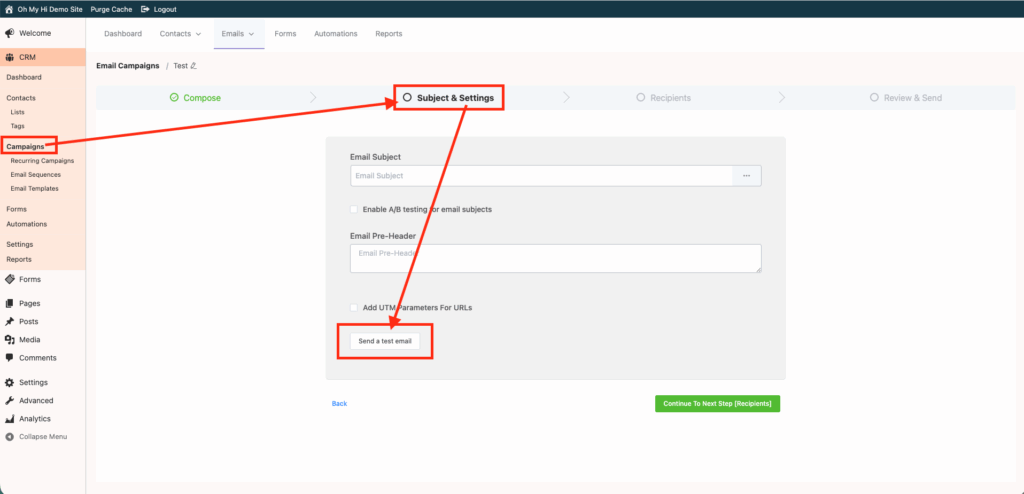
- In the CRM, go to your campaign and click Send a Test Email
- Paste in the email address from mail-tester.com and click send
- Go back to mail-tester.com and click “Then check your score”
- Wait for it to receive the email and review your score
If it points out any issues, adjust before sending to your full list.
Step 3: Send to Your Most Engaged Contacts First
(If you are coming from another email platform and have this information, otherwise skip to Step 4)
Start with the people most likely to:
- Open
- Click
- Engage
This gives you the best possible start.
Step 4: Follow a Gradual Sending Schedule
Do not send to your full list right away.
Use a gradual ramp-up like this:
| Day | Volume |
| Day 1 | 50–75 |
| Day 2 | 75-100 |
| Day 3 | 100-200 |
| Day 4 | 200-300 |
| Day 5 | 300-500 |
| Day 6+ | Continue increasing gradually until you reach full volume/list size – depending on the size of your list |
Example:
If you have 725 contacts:
- Day 1: send to 50
- Day 2: send to 75
- Day 3: send to 150
- Day 4: send to 200
- Day 5: send to remaining 250
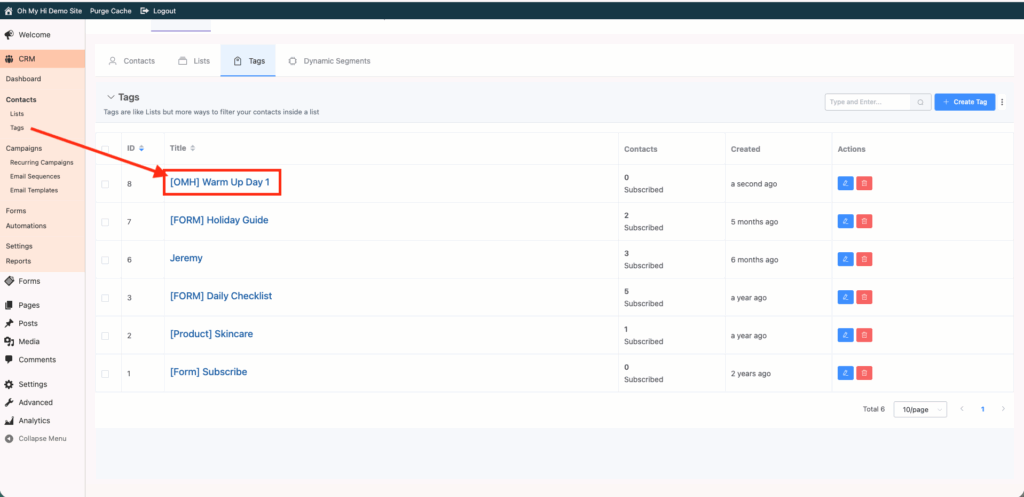
We recommend creating tags, for example: Day 1 Email Warm Up, Day 2 Email Warm Up, etc. Use these tags to segment your larger list for easy sending
Step 1: Create your warm-up tag(s)
Create tags to organize your contacts for each day of your warm-up.
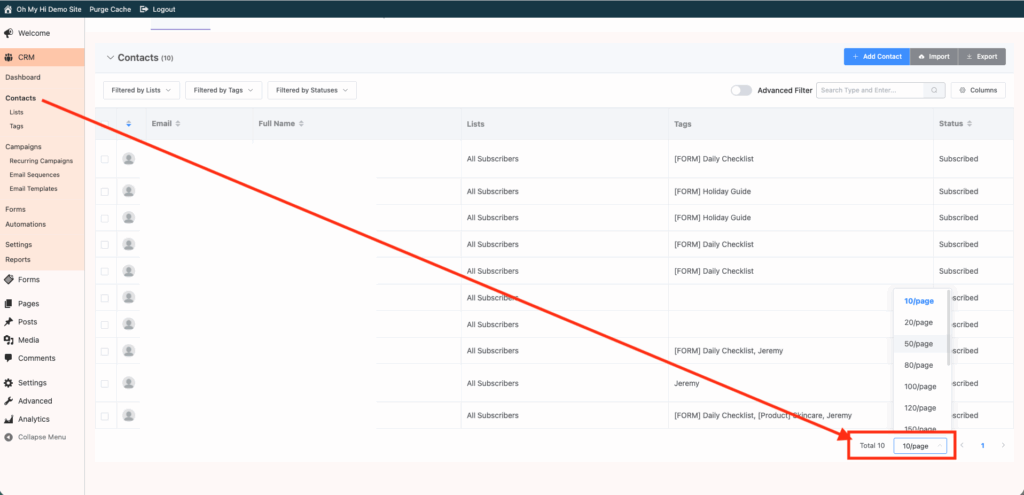
Step 2: Adjust how many contacts you can see per page
If needed, increase the number of contacts shown per page so it’s easier to select the right amount for each day.
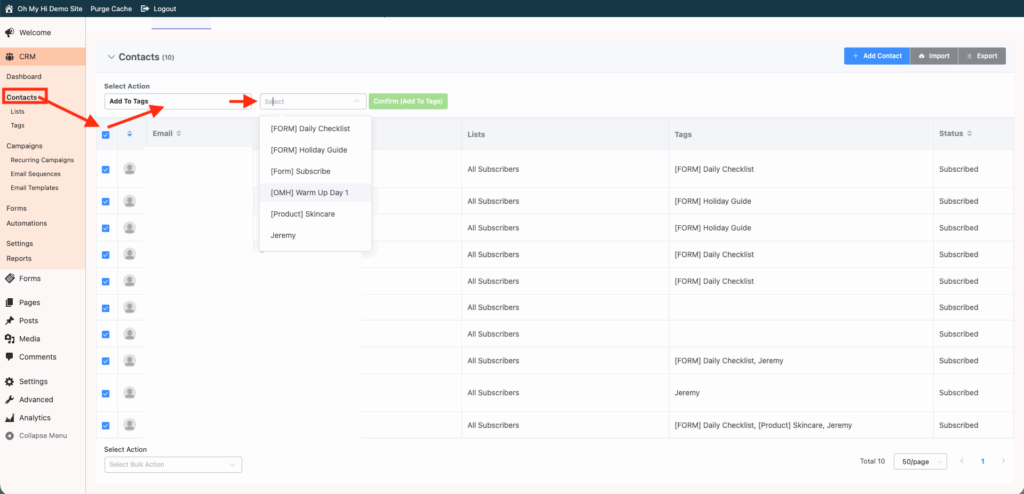
Step 3: Select contacts and apply your warm-up tag
Select the number of contacts you want for that day, then use the Add to Tags option to apply your warm-up tag.
Step 5: Monitor Your Results Daily
Before sending the next day, check your results.
During your warm-up, keep an eye on:
- Spam complaints: should stay under 0.1%
- Bounce rate: ideally under 5%
- Open rates: aim for 30% or higher
⚠️ If you notice issues:
- Pause sending
- Re-check your list
- Reduce your volume
- Send us a message if you’d like us to take a look
Step 6: Transition to Regular Sending
Once your entire list has been warmed up, you can begin sending regularly.
We recommend:
- Avoiding highly sales-focused emails at first
- Keeping your image-to-text ratio low
- Minimizing the number of links in your emails – only include 1 or 2
Note:
If you want to share promotions or company sales, consider creating a sales or promotion page on your Oh My Hi site and linking to it in your email. This allows interested subscribers to click through while keeping your emails clean and deliverability-friendly.
What NOT to Do
These are the fastest ways to hurt your deliverability:
- Sending to your entire list immediately
- Including subscribers inactive for 12 months or more
- Jumping from low to high volume too quickly
- Sending multiple large campaigns in one day
- Reusing old emails that previously had complaints or who have unsubscribed
Final Thoughts
Warming up your email list might feel slow, but it’s what sets you up for long-term success.
Taking the time to do this properly means:
- Better inbox placement
- Higher open rates
- More engagement from your list
- Better results from your emails