
Oh My Hi automatically handles the essential SEO settings for every page and post you create — no setup required. But you also have the option to customize how any specific page appears in search results, and to control which pages search engines can index. This doc walks you through both the per-page SEO controls in the editor and the site-wide archive settings available by contacting us and asking for them to be enabled.
Per-Page SEO Controls
When you edit any page or post in Oh My Hi, you’ll find an SEO panel in the right-hand sidebar (under the Page or Post tab). It’s completely optional — if you leave all the fields blank, Oh My Hi’s automatic defaults kick in just like they always have. But when you want more control, it’s right there.
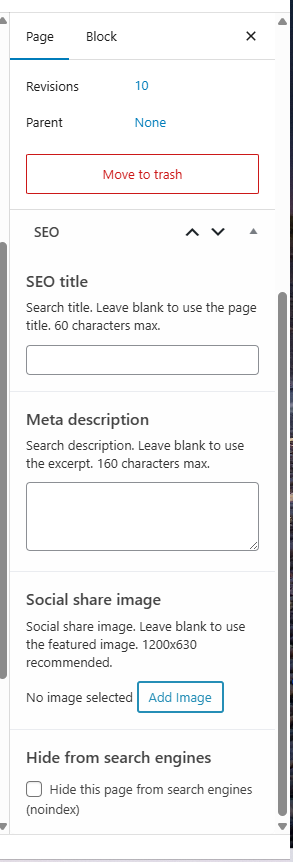
SEO Title
This is the title that appears in Google search results — separate from the headline your visitors see on the page itself. Leave it blank and Oh My Hi uses your page title automatically. Fill it in when you want your on-page headline to be short or punchy, while giving search engines a more descriptive version.
💡 Keep your SEO title under 60 characters so it doesn’t get cut off in search results.
Meta Description
This is the short snippet of text that appears under your title in search results. By default, Oh My Hi uses your excerpt. Set a custom meta description here when your excerpt is written for your site visitors and doesn’t read well as a search result — or when you want to specifically optimize the wording for click-throughs.
💡 Aim for 120–160 characters — enough to summarize the page and give people a reason to click.
Social Share Image
This image overrides your featured image specifically for social sharing cards — the preview that appears when someone shares your link on Facebook, Twitter/X, or LinkedIn. Leave it blank and Oh My Hi uses your featured image. Set a custom image here when you want a different crop, layout, or graphic to appear on social media.
💡 The recommended size is 1200 x 630 pixels.
Hide This Page from Search Engines
This checkbox tells search engines not to index the page (a “noindex” instruction). Use it for pages you don’t want showing up in search results — things like private intake forms, onboarding pages, internal resources, or anything that’s only meant for people you send directly to it.
⚠️ When you check this box, the page is also automatically removed from your XML sitemap — so search engines get the same signal from both places.
Archive Indexing Settings
In addition to the per-page controls, our support team can customize site-wide settings for controlling whether archive pages (tag archives, category archives, author archives, and date archives) are indexed by search engines. Just reach out to support if you need any of these settings changed.
Noindex Tag Archives
When enabled, tag archive pages (e.g., yoursite.com/tag/yoga) are hidden from search engines. This is off by default so your tag archives will be indexed by search engines and shown in search results.
Noindex Category Archives
When enabled, category archive pages (e.g., yoursite.com/category/news) are hidden from search engines. This is off by default so your category archives will be indexed by search engines and shown in search results.
Noindex Author Archives
Author archive pages (e.g., yoursite.com/author/jane) are hidden from search engines by default. Since Oh My Hi sites typically have a single author, these pages rarely provide useful search value.
Noindex Date Archives
Date-based archive pages (e.g., yoursite.com/2026/04) are hidden from search engines by default. Date archives almost never drive useful search traffic on personal or small-business sites, so this is the default for Oh My Hi sites.
💡 Author and date archives are also excluded from your XML sitemap by default, keeping your sitemap clean and focused on content that matters.
Wrap-Up
Oh My Hi’s SEO defaults are designed to work well for most pages without any extra effort. The per-page controls and archive settings give you the flexibility to go further when you need to — without adding complexity you don’t.
What’s Next?
Want to understand how Oh My Hi handles all the other SEO basics automatically? Check out How Oh My Hi Handles SEO for Your Website So You Don’t Have To.
Ready to Simplify Your Website and SEO?
If you’re not already using Oh My Hi, there’s never been a better time to start. We built this platform to make running your website easy and that includes taking care of the technical SEO stuff for you.
✨ No special software.
✨ No complicated settings.
✨ Just a beautiful, easy-to-use site that helps you get found online.
👉 Start today and see how stress-free your website can be with Oh My Hi.