

Redirects Are Here — Manage Them Yourself, Right From Your Dashboard
Here’s what’s new in our latest update.
🔀 Set Up Your Own URL Redirects
You can now create simple redirects directly from your admin dashboard — no support ticket needed. Look for the new Redirects menu item in your sidebar.
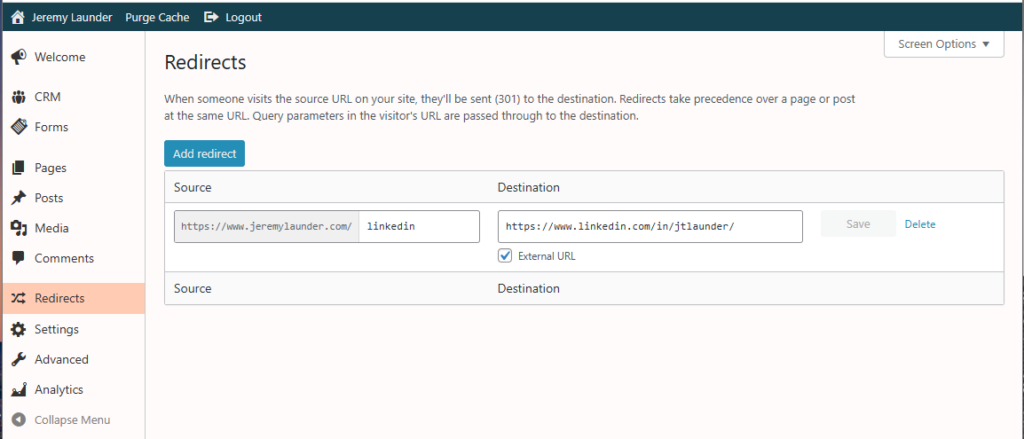
A redirect sends visitors from one URL on your site to another. Common reasons you might want one:
- You renamed a page. Visitors (and Google) coming from the old URL get sent automatically to the new one.
- You’re using a short, memorable URL for a campaign. yoursite.com/spring could redirect to a longer URL on your site or anywhere else on the web.
- You moved something off-site. Send yoursite.com/shop to your Etsy store, your booking page, or anywhere else.
✏️ Dead Simple to Add
Click Add redirect, fill in two fields, click Save:
- Source — the path on your site you want to redirect (e.g., old-about)
- Destination — where to send visitors (another path on your site, or check the “External URL” box to send them somewhere off-site)
That’s it. The redirect is live the moment you click Save.
🪄 It Just Works
A few things are handled automatically so you don’t have to think about them:
- Trailing slashes don’t matter — /old-about and /old-about/ are treated as the same redirect.
- Query strings carry through — if a visitor clicks a link like /old-about?utm_source=newsletter, your tracking parameters travel along to the destination.
- Redirects win over real pages — if you set up a redirect for a URL that also happens to be a real page on your site, the redirect takes priority.
🛠️ Edit or Delete Anytime
Every redirect in your list is editable right where it sits — just type a new source or destination into the box and click Save. The Delete button next to each row removes it instantly (with a quick confirmation first so you don’t delete one by accident).
💡 Tips
- Keep your sources simple. Just the path — contact-old rather than the full URL. We’ll show you the prefix so it’s clear what visitors will type.
- Test your redirect. After saving, paste the source URL into a new browser tab to confirm it sends you to the right place.
- Got a lot of redirects? Use the search box at the top of the list to find a specific one quickly.
Nothing you need to do to get started
The new Redirects menu is already waiting for you. If you have any questions or run into trouble, just reach out to support and we’ll help you get set up!
Leave a Reply