
SEO and Social Sharing Improvements
Here’s a quick look at what’s new in our latest update.
🔍 Take Control of How Your Pages Look in Search Results
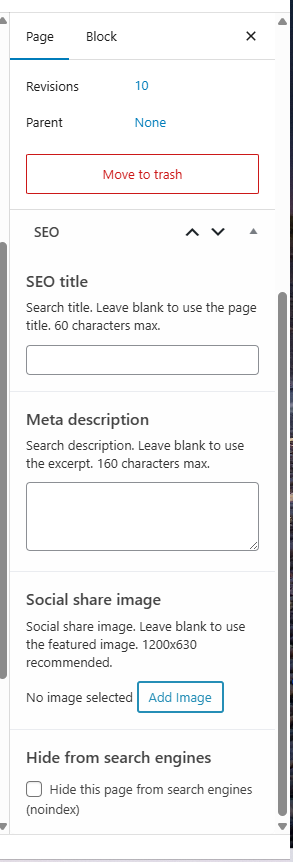
Every page and blog post now has a new “SEO” panel in the right-hand sidebar where you can customize:
- SEO title — the headline that shows up in Google’s search results (separate from your page title, so you can write one for visitors and a different one optimized for search)
- Meta description — the short blurb under the title in search results
- Social share image — the image people see when your page is shared on Facebook, LinkedIn, or anywhere else
- Hide from search engines — tell Google not to index a specific page (great for thank-you pages, onboarding forms, or anything you’d rather keep private from search)
Every field has sensible defaults if you leave it blank — your page title, excerpt, and featured image will still be used the way they always have.
🐦 Better Previews When People Share Your Pages
Pages shared on Twitter/X now display as large, eye-catching image cards instead of plain text links. Same polish carries through to Facebook, LinkedIn, and other platforms — your pages should look better wherever they’re shared.
📈 Smarter Default SEO
Author and date archive pages (the auto-generated pages that list all posts by a single author or from a specific month) are now hidden from search engines by default. These pages rarely drive useful traffic and can dilute your stronger pages — keeping them out of search lets Google focus on the content that matters.
If you want these archives indexed for any reason, just reach out to support and we’ll flip them back on for your site.
✅ No More “/feed/” Errors in Search Console
If you’ve ever poked into Google Search Console and seen mysterious server errors for /feed/ or /comments/feed/, those are now resolved. Search engines will get a cleaner signal that those URLs are intentionally turned off and stop reporting them as broken.
Nothing you need to do
This update rolled out automatically. If anything looks off, just reach out to support and we’ll take care of it!
Leave a Reply